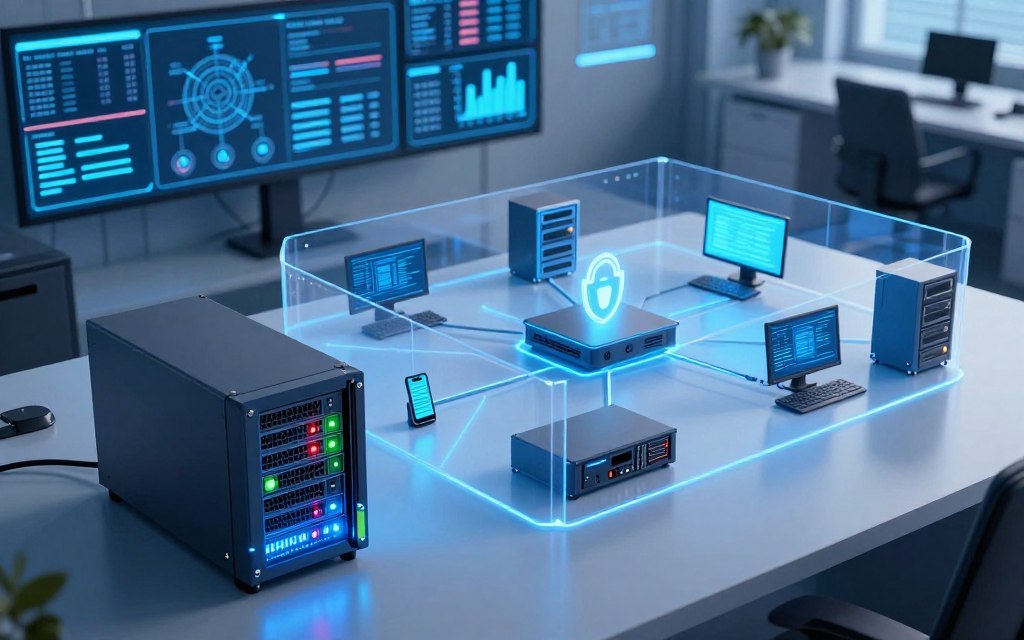

A network firewall monitors and controls traffic entering or leaving a network. As a barrier, it provides firewall protection for computers, servers, mobile devices, applications, and sensitive data from unauthorized access and malicious activity.
This article explains the role of firewalls in modern network security. It explores how firewall technology works, compares major types, and covers configuration and deployment. This knowledge helps business owners, IT administrators, and anyone seeking clear information about device security and data protection.
A firewall is an important defensive layer, but it needs support from other security measures. These include endpoint protection, secure authentication, regular patching, data backups, and user awareness. Together, these measures provide strong protection against changing threats.
Key Takeaways
- A network firewall monitors traffic to protect devices and data.
- Firewalls are essential for both corporate networks and personal computers.
- They can be hardware appliances or software programs.
- Firewalls help block unauthorized access and mitigate cyber threats.
- Complementary security measures are necessary for comprehensive protection.
- Learn more about firewall functions here.
What Is the Firewall in Computer Network?
Firewalls protect data and control traffic across computer networks. To explain what is the firewall in computer network, picture a barrier between trusted networks and the internet. It follows security rules to allow valid connections and block traffic that breaks an organization’s security policy.
The firewall definition centers on protecting private networks from public internet threats. Firewalls can also divide internal networks, which limits movement after a breach. This separation protects sensitive data and resources by restricting access.
Definition and Core Purpose
A firewall may be hardware, software, or a cloud-based service. It checks incoming and outgoing traffic against predefined security rules, creating a network perimeter security layer that permits safe, authorized traffic.
Unlike antivirus software, a computer network firewall controls traffic instead of finding and removing malicious files on devices. This difference matters because both tools support a complete security strategy.
Historical Evolution of Firewalls
Firewalls evolved from basic packet-filtering technology into more advanced systems. Early firewalls checked addresses, ports, and protocols. Later systems added stateful inspection, which tracks active connections and uses traffic context to make decisions.
Proxy firewalls then appeared as intermediaries between users and the internet. They filter traffic and cache data to improve performance. Next-generation firewalls (NGFW) added deeper inspection, application awareness, and user identification.
Today, cloud-delivered security services help organizations protect networks without much on-premises hardware. Modern firewalls inspect applications, detect threats, and connect with broader security platforms. They provide broad defense against changing cyber threats.
| Firewall Type | Key Features | Usage Scenario |
|---|---|---|
| Packet-Filtering Firewall | Inspects packets based on headers | Basic network security |
| Stateful Inspection Firewall | Tracks active connections | Dynamic traffic management |
| Proxy Firewall | Acts as an intermediary | Content filtering and caching |
| Next-Generation Firewall (NGFW) | Application awareness and threat detection | Advanced security needs |
| Cloud-Based Firewall | Remote protection and scalability | Flexible and scalable solutions |
How Network Firewalls Work
To understand network firewalls, study how they operate. These devices protect networks through traffic filtering based on set rules. Their operation matters to everyone involved in network security.
The Packet Inspection Process
When a data packet reaches a network interface, the firewall begins a detailed review. This packet inspection checks several parts of the packet, including:
- Source IP address
- Destination IP address
- Ports
- Protocols
- Connection state
- Application identity
- User context
The firewall compares this information with ordered firewall rules. It can allow, deny, reject, or log the connection attempt. Rule order matters because the first match decides the action.
Rule-Based Access Control
Effective access control depends on clear rules. Least privilege gives users only the access needed for their tasks. Firewalls apply this principle to both inbound and outbound traffic.
For example, a firewall may allow HTTPS traffic to a public web server. It may block unused management ports, which reduces exposure to possible threats.
Modern firewalls use deep packet inspection (DPI) for fuller analysis than traditional systems. However, too much inspection or poorly optimized rules can reduce performance. Careful management of these settings is essential.
| Packet Element | Importance | Action Taken |
|---|---|---|
| Source IP Address | Identifies where the packet originates | Allowed or blocked based on rules |
| Destination IP Address | Indicates where the packet is going | Allowed or blocked based on rules |
| Ports | Specifies the communication endpoints | Allowed or blocked based on rules |
| Protocols | Defines the type of communication | Allowed or blocked based on rules |
Types of Network Firewalls
Knowing the main network firewall types helps organizations protect their networks. Each type has different uses, strengths, and limits. We examine five main categories and their typical functions.
Packet-Filtering Firewalls
A packet-filtering firewall works at the network layer and checks packets against set rules. It reviews basic details, including IP addresses, ports, and protocols. This simple design processes traffic quickly and adds little latency.
However, it cannot understand applications or inspect packet content. Malicious data may therefore look like legitimate traffic. This weakness can make it unsuitable for complex network environments.
Stateful Inspection Firewalls
A stateful firewall tracks active connections to improve security. Unlike packet-filtering firewalls, it keeps a state table for each session. This context helps it block unauthorized access.
It recognizes established sessions and separates legitimate traffic from suspicious traffic. That skill helps defend against attacks such as spoofing and session hijacking.
Proxy Firewalls
Proxy firewalls act as intermediaries between users and requested services. Each proxy firewall routes traffic through itself, inspects it, and separates data flows. This control can block malicious content before it reaches the internal network.
Proxy firewalls can also cache content, which may speed up frequently used resources. However, this design can add latency and require more management resources.
Next-Generation Firewalls (NGFW)
Next-generation firewalls (NGFW) mark a major advance in firewall technology. They combine traditional firewall tools with application control, deep packet inspection, intrusion prevention, and malware detection. This layered approach helps organizations address modern threats.
A next-generation firewall can also provide centralized management for security teams. It helps teams monitor incidents and respond more easily. Visibility into user behavior and application use supports stronger security policies.
Cloud-Based Firewalls
Cloud firewalls protect cloud workloads, remote users, and distributed environments. A cloud firewall runs in the cloud instead of on-premises, reducing physical infrastructure needs. This flexibility helps remote workforces and organizations that rely heavily on cloud services.
Cloud firewalls can apply consistent security policies across all environments. This reduces vulnerabilities caused by separate systems. Organizations must still check compliance needs and choose a suitable solution.
Choosing a firewall depends on network architecture, traffic volume, compliance needs, staffing, and budget. It also depends on the visibility level an organization requires. Each type offers unique benefits, helping teams make informed security choices.
Key Benefits of Network Firewalls
Network firewalls are a key part of an organization’s security plan. They protect sensitive data, support regulatory standards, and strengthen overall network security. Knowing these benefits helps organizations use firewalls well and improve secure network access.
Enhanced Network Security
A main benefit of network firewalls is their ability to enhance network security. They support threat prevention by:
- Blocking unauthorized connections: Firewalls prevent unwanted access and separate trusted internal networks from untrusted outside sources.
- Reducing exposed services: Firewalls limit visible services and reduce possible attack paths.
- Segmenting sensitive systems: Firewalls create separate network zones and isolate critical systems.
- Limiting attack paths: Clear rules restrict the routes attackers can use to harm network security.
Regulatory Compliance Support
Organizations must show that they use proper security measures. Firewalls support firewall compliance by:
- Implementing strict firewall policies and access controls.
- Maintaining logs that provide an audit trail for security reviews.
- Facilitating documented reviews to ensure adherence to frameworks and regulations.
Firewalls are essential, but they cannot guarantee compliance alone. They must support a broader security strategy.
Improved Network Performance
Network firewalls can also improve overall network performance. They do this through:
- Traffic prioritization: Firewalls can prioritize critical applications, ensuring they receive the necessary bandwidth.
- Bandwidth management: By controlling the amount of data transmitted, firewalls help optimize resource allocation.
- Filtering unwanted traffic: Firewalls block non-essential traffic, which can reduce congestion and enhance user experience.
- Preventing unnecessary connections: By limiting connections to only those that are required, firewalls conserve resources and maintain performance levels.
However, firewall performance depends on suitable hardware, accurate rules, current threat intelligence, and proper setup.

In summary, firewalls are defensive technologies and useful management tools. They control network resource use, support secure network access, and provide network security benefits.
How Firewalls Protect Your Devices and Data
Firewalls create a critical barrier between your network and potential threats. They manage data flow and allow only authorized traffic to pass. This protection helps secure your devices and sensitive information.
By blocking unsolicited connection attempts, firewalls provide unauthorized access protection. They limit access to administrative interfaces and allow approved users, applications, or services to communicate with protected systems. This proactive defense lowers the risk of unauthorized intrusions.
Blocking Unauthorized Access
One primary firewall function is blocking unauthorized access attempts. Firewalls filter unwanted traffic that could harm network integrity. Using predefined rules, firewalls identify and deny suspicious connections, protecting devices from potential threats.
Filtering Malicious Traffic
Firewalls excel at filtering malicious traffic. This traffic may include exploit attempts, command-and-control communications, port scans, and connections linked to known threats. By analyzing incoming data packets, firewalls detect and stop threats before they reach your internal network.
Preventing Data Breaches
Another key firewall role is data breach prevention. By controlling network paths, firewalls reduce the chance and impact of data breaches. However, firewalls cannot guarantee complete security against every form of compromise.
Monitoring Network Activity
Effective network monitoring is vital for security. Firewalls log connection attempts, record denied traffic, and provide firewall alerts for rule matches and anomalies. Security teams use this information to investigate incidents, find misconfigurations, and detect unusual behavior.
Protecting these logs from unauthorized changes is essential for compliance and auditing.
Regular traffic report reviews help organizations improve security policies and strengthen protection. Retaining logs under business and compliance requirements keeps critical data available for future reference.
| Firewall Function | Description | Benefit |
|---|---|---|
| Blocking Unauthorized Access | Prevents unsolicited connection attempts | Enhances network security |
| Filtering Malicious Traffic | Identifies and blocks harmful data packets | Reduces risk of attacks |
| Preventing Data Breaches | Controls network paths to safeguard sensitive data | Minimizes data loss impact |
| Monitoring Network Activity | Logs traffic and alerts for anomalies | Improves incident response |
Firewall Deployment Methods
Organizations can use several methods for firewall deployment across their networks. Each method offers different strengths for specific security needs. Knowing these options helps organizations choose the right protection for their environments.
Hardware Firewalls
Hardware firewalls are dedicated devices placed between networks and internet connections. They can also separate internal network segments. A hardware firewall applies security policies across many devices, delivers high throughput, and protects larger organizations.
Key advantages of hardware firewalls include:
- Centralized management of security policies.
- High performance and low latency.
- Protection for multiple devices within the network.
Organizations must plan maintenance and capacity as network demands grow. This planning helps hardware firewalls continue meeting security needs.
Software Firewalls
Software firewalls run on individual computers, servers, or virtual machines. They provide host-level control based on applications, processes, users, or connection details. This flexibility helps laptops and remote workers using different networks.
Benefits of software firewalls include:
- Granular control over application-level traffic.
- Easy installation and updates.
- Protection for devices that frequently change networks.
Cloud-Based Firewalls
Cloud-based firewalls protect cloud infrastructure, software platforms, remote access points, and distributed users. A cloud-based firewall can scale and adapt to changing environments.
These firewalls support hybrid network security models. Organizations can combine hardware, software, and cloud-based firewalls as coordinated security layers instead of separate tools.
| Deployment Method | Advantages | Ideal For |
|---|---|---|
| Hardware Firewall | Centralized management, high throughput | Large organizations |
| Software Firewall | Granular control, easy updates | Remote workers, individual devices |
| Cloud-Based Firewall | Scalability, flexibility | Dynamic environments |
Common Firewall Features and Capabilities
Modern firewalls offer features that improve security and efficiency. These tools help protect networks from many threats. Learning about them helps organizations choose suitable firewall solutions.
Deep Packet Inspection (DPI)
Deep Packet Inspection (DPI) is a key feature in modern firewalls. Basic filters inspect only packet headers, but DPI examines packet content. This helps firewalls spot prohibited or suspicious activity through application behavior and protocol details.
DPI needs careful planning before use. Organizations must assess inspection depth, encryption, performance needs, and privacy risks before enabling broad analysis. Balancing these concerns protects network performance while supporting strong security.
Intrusion Detection and Prevention Systems (IDPS)
Another key feature is the Intrusion Detection and Prevention System (IDPS). It identifies patterns linked to possible attacks. Depending on its settings, it can alert users or block suspicious activity.
It is important to know the difference between detection and prevention. The intrusion detection system mainly reports suspicious events. The intrusion prevention system enforces actions that reduce threats.
Together, these functions improve network security.
Virtual Private Network (VPN) Support
Modern firewalls also support Virtual Private Network (VPN) connections. VPNs encrypt links between remote users, offices, and protected networks. This keeps sensitive data secure during transmission.
A VPN firewall’s effectiveness depends on several factors. Strong authentication, current encryption standards, secure settings, and suitable access policies protect encrypted network traffic. Organizations should prioritize these elements to strengthen VPN security.
Best Practices for Firewall Configuration
Effective firewall configuration best practices begin with documented security policies. Policies should identify approved services, trusted users, protected assets, business requirements, and prohibited traffic. This helps everyone understand network access and data protection rules.
A leading firewall configuration best practice uses a least privilege access approach. This approach grants users access only when necessary, for the shortest time, and from defined sources. Limiting access rights greatly reduces unauthorized access and breach risks.
Establishing Security Policies
A security policy guides firewall configuration. It should include:
- Identification of critical assets and data
- Defined user roles and access levels
- Protocols for handling sensitive information
- Guidelines for responding to security incidents
Regular reviews and updates help these policies address new threats and organizational changes.
Regular Updates and Patch Management
Keeping firewall systems updated is vital for strong protection. This includes:
- Updating operating systems and firmware
- Maintaining threat intelligence feeds
- Implementing a defined schedule for updates
- Establishing emergency processes for critical vulnerabilities
By prioritizing firewall patch management, organizations close security gaps attackers might exploit.
Monitoring and Logging
Monitoring network activity and using firewall logging help identify potential threats. Key practices include:
- Centralized log collection for easier analysis
- Setting alert thresholds for suspicious activities
- Periodic reviews of firewall rules
- Time synchronization for accurate logging
Documented incident-response procedures help organizations respond quickly to security breaches.
These practices strengthen firewall security without disrupting legitimate operations. For more guidance, review the NIST Special Publication on firewall management.
Conclusion
Network firewalls are a key part of any firewall security strategy. They control traffic among networks, devices, applications, and services by using established security rules. They block unauthorized access and harmful traffic, providing essential network protection.
Firewalls support network segmentation, which helps protect sensitive data. They continuously monitor network activity and help organizations follow various regulations. Choose a firewall based on your infrastructure, cloud use, and remote-access needs.
Effective cybersecurity defense requires more than installing a firewall. Organizations must create strong security policies, update systems regularly, and review logs. Testing firewall rules helps maintain protection against emerging threats.
Businesses and individuals should view firewalls as a foundation for broader cybersecurity defense. That strategy should include secure credentials, multifactor authentication, endpoint protection, regular backups, patch management, and user education. These steps help secure devices and data and create a safer digital environment.

 By
By